


# This function writes data into file
def fileWrite():
# fopen=open("sample.txt","w+")
with open("sample.txt","w+") as fopen: # Trying to open a file using 'with' operator. This automatically closes the file.
msg=raw_input('\nEnter the string you want to add to file:\t')
fopen.write(msg)
# fopen.close()
# This function reads data from a file
def fileRead():
fopen=open("sample.txt","r+")
msg=fopen.read() # You can also specify the read(arg) to some numeric value to read till specific line size.
print '\nCharacters read from the file: ',msg
fopen.close()
# This function will append data to existing file
def fileAppend():
fopen=open("sample.txt","a+")
msg=raw_input('\n Enter the string you want to append: ')
fopen.write(msg)
# Reading characters from file after appending
str=fopen.read()
print str
# This function splits words in a file & also counts # of words
def fileSplit():
with open("sample.txt","r+") as fobj:
data=fobj.read()
count=0
for i in data:
word=data.split()
print word
print 'Word count is:',data.count(' ')+1 # This function counts number of words in file
print '\n *** This program demonstrates various operations on Files****'
print '\n 1. Write to a file \n 2. Read from file \n 3. Append data to file \n 4. Word count in file'
option=input('Enter the option you want to perform:')
if option==1:
print '***Write() will append the data to mentioned file (or) will create a new file ***'
fileWrite()
elif option==2:
print '\n *** Read() function will try to read data from existing file***'
fileRead()
elif option==3:
print '\n *** APpend() function will append data to mentioned file (or) create a new file if file doesn\'t exist'
fileAppend()
elif option==4:
print '\n ****Counting Number of words in file ****'
fileSplit()
else:
print 'Your option was not right'
# Output:

# Python Geometric class
class geometryClass:
def __init__(self,length,breath,radius,height,base1,base2):
self.length=length
self.breath=breath
self.radius=radius
self.height=height
self.base1=base1
self.base2=base2
def square(self):
area_sqr=self.length ** 2
return area_sqr;
def rectangle(self):
area_rect=self.length*self.breath
return area_rect;
def circle(self):
area_circle=3.14*(self.radius ** 2)
return area_circle;
def triangle(self):
area_tri=0.5*self.base1*self.height
return area_tri;
def parallelogram(self):
area_para=self.base2*self.height
return area_para;
def trapezoid(self):
area_trap=0.5*self.base1*self.base2*self.height;
return area_trap;
shape=geometryClass(5,3,2,4,6,3);
print shape.square();

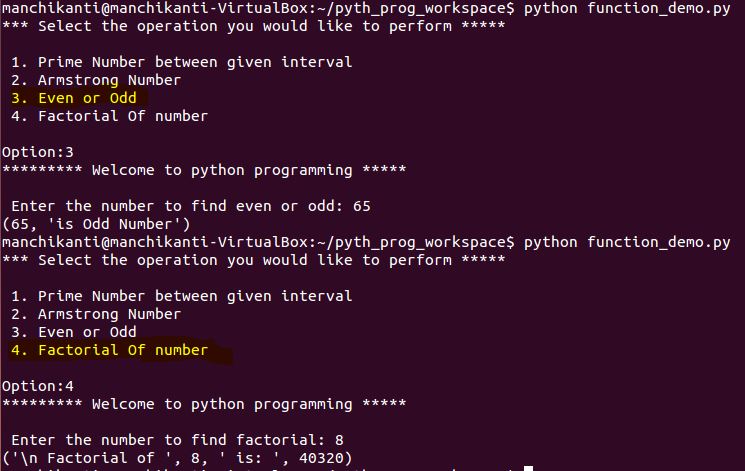
print '*** Select the operation you would like to perform *****'
print '\n 1. Prime Number between given interval \n 2. Armstrong Number \n 3. Even or Odd \n 4. Factorial Of number \n'
option=input('Option:')
message='********* Welcome to python programming *****'
def test(message):
print message
return;
test(message);
def prime_number(prime_range):
for num in range(2,prime_range+1):
for i in range(2, num):
if (num%i==0):
break
else:
print num
return;
def armstrongNumber(num):
temp=num;
sum=0;
while temp >1:
rem=temp%10;
sum+=rem**3
temp
if sum==num:
print (num,'is an Armstrong Number')
else:
print (num,'is not an Armstrong Number')
return;
def evenodd(num):
if(num%2==0):
print (num,'is Even Number')
else:
print (num,'is Odd Number')
return;
def factorial(num):
fact=1
if(num < 1):
print '\n Factorial doesnt exist for negative numbers'
elif num==0:
print '\n Factorial of 0 is 1'
else:
for i in range(1, num+1):
fact=fact*i;
print ('\n Factorial of ',num,' is: ',fact)
return;
if option==1:
prime_range=input('\n Enter the range till you want to find prime numbers:')
prime_number(prime_range);
elif option==2:
num=input('\n Enter the number to check if it is armstrong or not: ')
armstrongNumber(num);
elif option==3:
num=input('\n Enter the number to find even or odd: ')
evenodd(num);
elif option==4:
num=input('\n Enter the number to find factorial: ')
factorial(num);
else:
print '\n Invalid option'

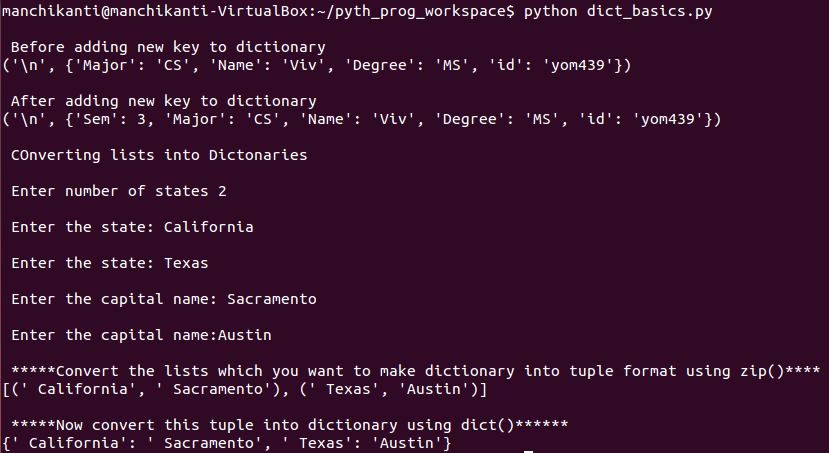
data={'Name':'Viv','id':'yom439','Major':'CS','Degree':'MS'}
print (data['Name'])
print (data['Major'])
print ('\n Before adding new key to dictionary');
print("\n",data)
data['Sem']=3 # Adding new key to dictionary
print ('\n After adding new key to dictionary');
print("\n",data)
#Notes: data.clear() clears all entries in dictionary
#Notes: del data; deletes dictionary
# Converting lists into Dictionaries
print '\n Converting lists into Dictionaries'
numofstates=int(raw_input('\n Enter number of states'))
for i in range(0, numofstates):
statename=raw_input('\n Enter the state:')
states[statename]={}
capitals={}
for j in range(0,numofstates):
capitalname=raw_input('\n Enter the capital name:')
capitals[capitalname]={}
# Step 1: Convert the lists which you want to make dictionary into tuple format using zip()
state_capital=zip(states,capitals)
print '\n'
print(state_capital)
# Step 2: Now convert this tuple into dictionary using dict()
states_and_capitals=dict(state_capital)
print '\n'
print(states_and_capitals)
# This program holds basic operations performed by list such as 'Adding new entry', 'Inserting list element', 'Extending list'

# Programming illustrating how we can use 'list' with iterations using for loop
num1=int(raw_input("Enter first number"));
num2=int(raw_input("Enter second number"));
num3=int(raw_input("Enter third number"));
num4=int(raw_input("Enter fourth number"));
num5=int(raw_input("Enter fifth number"));
num6=int(raw_input("Enter sixth number"));
number=[num1, num2, num3, num4, num5, num6]; #this list(number) holds values provided by users and form an input to for loop.
# these empty lists will hold even and odd number provided by user in their lists
even_num=[]
odd_num=[]
print ("The provided numbers are:",number);
for value in number:
if value%2==0:
even_num.append(value);
elif value%2!=0:
odd_num.append(value);
else:
print("Value is neither even nor odd");
print('\n List of Even numbers are:',even_num);
print('\n List of odd number are:',odd_num);

# A python program that uses 'Conditional statements / Decision Making' and operates on user specified input
num1=input("enter first number:"); # This will read the input and tries to understand.
num2=int(raw_input("enter second number:")); #raw_input() will convert the provided input to string by default. Ex: try removing typecasting int() and run and provide the operation 1 or 6 and see the difference.
print("*****Possible Arithmetic operations*****\n");
print("1. Addition");
print("2. Subtraction");
print("3. Multiplication");
print("4. Division");
print("5. Modulo");
print("6. Exponent");
operation=input("******Enter the Arithmetic operation you would like to perform******* \n");
if operation==1:
addRes=num1+num2;
print("Addition of {0} and {1} is {2} \n".format(num1,num2,addRes));
elif operation==2:
subRes=num1-num2;
print("Subtraction of {0} and {1} is {2} \n".format(num1,num2,subRes));
elif operation==3:
mulRes=num1*num2;
print("Multiplication of {0} and {1} is {2}\n".format(num1,num2,mulRes));
elif operation==4:
divRes=float(num1)/float(num2);
print("Division of {0} and {1} is {2}\n".format(num1,num2,divRes));
elif operation==5:
modRes=float(num1)/float(num2);
print("Modulous of {0} and {1} is {2}\n".format(num1,num2,modRes));
elif operation==6:
expRes=num1**num2;
print("Exponent of {0} and {1} is {2}\n".format(num1,num2,expRes));
else:
print("No such option available");

Accessibility Wizard = accwiz
Add Hardware Wizard = hdwwiz.cpl
Add/Remove Programs = appwiz.cpl
Administrative Tools = control admintools
Adobe Acrobat ( if installed ) = acrobat
Adobe Distiller ( if installed ) = acrodist
Adobe ImageReady ( if installed ) = imageready
Adobe Photoshop ( if installed ) = photoshop
Automatic Updates = wuaucpl.cpl
Basic Media Player = mplay32
Bluetooth Transfer Wizard = fsquirt
Calculator = calc
Ccleaner ( if installed ) = ccleaner
C: Drive = c:
Certificate Manager = cdrtmgr.msc
Character Map = charmap
Check Disk Utility = chkdsk
Clipboard Viewer = clipbrd
Command Prompt = cmd
Command Prompt = command
Component Services = dcomcnfg
Computer Management = compmgmt.msc
Compare Files = comp
Control Panel = control
Create a shared folder Wizard = shrpubw
Date and Time Properties = timedate.cpl
DDE Shares = ddeshare
Device Manager = devmgmt.msc
Direct X Control Panel ( if installed ) = directx.cpl
Direct X Troubleshooter = dxdiag
Disk Cleanup Utility = cleanmgr
Disk Defragment = dfrg.msc
Disk Partition Manager = diskmgmt.msc
Display Properties = control desktop
Display Properties = desk.cpl
Display Properties (w/Appearance Tab Preselected ) = control color
Dr. Watson System Troubleshooting Utility = drwtsn32
Driver Verifier Utility = verifier
Ethereal ( if installed ) = ethereal
Event Viewer = eventvwr.msc
Files and Settings Transfer Tool = migwiz
File Signature Verification Tool = sigverif
Findfast = findfast.cpl
Firefox = firefox
Folders Properties = control folders
Fonts = fonts
Fonts Folder = fonts
Free Cell Card Game = freecell
Game Controllers = joy.cpl
Group Policy Editor ( xp pro ) = gpedit.msc
Hearts Card Game = mshearts
Help and Support = helpctr
Hyperterminal = hypertrm
Hotline Client = hotlineclient
Iexpress Wizard = iexpress
Indexing Service = ciadv.msc
Internet Connection Wizard = icwonn1
Internet Properties = inetcpl.cpl
Internet Setup Wizard = inetwiz
IP Configuration (Display Connection Configuration) = ipconfig /all
IP Configuration (Display DNS Cache Contents) = ipconfig /displaydns
IP Configuration (Delete DNS Cache Contents) = ipconfig /flushdns
IP Configuration (Release All Connections) = ipconfig /release
IP Configuration (Renew All Connections) = ipconfig /renew
IP Configuration (Refreshes DHCP & Re-Registers DNS) = ipconfig /registerdns
IP Configuration (Display DHCP Class ID) = ipconfig /showclassid
IP Configuration (Modifies DHCP Class ID) = ipconfig /setclassid
Java Control Panel ( if installed ) = jpicpl32.cpl
Java Control Panel ( if installed ) = javaws
Keyboard Properties = control keyboard
Local Security Settings = secpol.msc
Local Users and Groups = lusrmgr.msc
Logs You Out of Windows = logoff
Malicious Software Removal Tool = mrt
Microsoft Access ( if installed ) = access.cpl
Microsoft Chat = winchat
Microsoft Excel ( if installed ) = excel
Microsoft Diskpart = diskpart
Microsoft Frontpage ( if installed ) = frontpg
Microsoft Movie Maker = moviemk
Microsoft Management Console = mmc
Microsoft Narrator = narrator
Microsoft Paint = mspaint
Microsoft Powerpoint = powerpnt
Microsoft Word ( if installed ) = winword
Microsoft Syncronization Tool = mobsync
Minesweeper Game = winmine
Mouse Properties = control mouse
Mouse Properties = main.cpl
MS-Dos Editor = edit
MS-Dos FTP = ftp
Nero ( if installed ) = nero
Netmeeting = conf
Network Connections = control netconnections
Network Connections = ncpa.cpl
Network Setup Wizard = netsetup.cpl
Notepad = notepad
Nview Desktop Manager ( if installed ) = nvtuicpl.cpl
Object Packager = packager
ODBC Data Source Administrator = odbccp32
ODBC Data Source Administrator = odbccp32.cpl
On Screen Keyboard = osk
Opens AC3 Filter ( if installed ) = ac3filter.cpl
Outlook Express = msimn
Paint = pbrush
Password Properties = password.cpl
Performance Monitor = perfmon.msc
Performance Monitor = perfmon
Phone and Modem Options = telephon.cpl
Phone Dialer = dialer
Pinball Game = pinball
Power Configuration = powercfg.cpl
Printers and Faxes = control printers
Printers Folder = printers
Private Characters Editor = eudcedit
Quicktime ( if installed ) = quicktime.cpl
Quicktime Player ( if installed ) = quicktimeplayer
Real Player ( if installed ) = realplay
Regional Settings = intl.cpl
Registry Editor = regedit
Registry Editor = regedit32
Remote Access Phonebook = rasphone
Remote Desktop = mstsc
Removable Storage = ntmsmgr.msc
Removable Storage Operator Requests = ntmsoprq.msc
Resultant Set of Policy ( xp pro ) = rsop.msc
Scanners and Cameras = sticpl.cpl
Scheduled Tasks = control schedtasks
Security Center = wscui.cpl
Services = services.msc
Shared Folders = fsmgmt.msc
Sharing Session = rtcshare
Shuts Down Windows = shutdown
Sounds Recorder = sndrec32
Sounds and Audio = mmsys.cpl
Spider Solitare Card Game = spider
SQL Client Configuration = clicongf
System Configuration Editor = sysedit
System Configuration Utility = msconfig
System File Checker Utility ( Scan Immediately ) = sfc /scannow
System File Checker Utility ( Scan Once At Next Boot ) = sfc /scanonce
System File Checker Utility ( Scan On Every Boot ) = sfc /scanboot
System File Checker Utility ( Return to Default Settings) = sfc /revert
System File Checker Utility ( Purge File Cache ) = sfc /purgecache
System File Checker Utility ( Set Cache Size to Size x ) = sfc /cachesize=x
System Information = msinfo32
System Properties = sysdm.cpl
Task Manager = taskmgr
TCP Tester = tcptest
Telnet Client = telnet
Tweak UI ( if installed ) = tweakui
User Account Management = nusrmgr.cpl
Utility Manager = utilman
Volume Serial Number for C: = label
Volume Control = sndvol32
Windows Address Book = wab
Windows Address Book Import Utility = wabmig
Windows Backup Utility ( if installed ) = ntbackup
Windows Explorer = explorer
Windows Firewall = firewall.cpl
Windows Installer Details = msiexec
Windows Magnifier = magnify
Windows Management Infrastructure = wmimgmt.msc
Windows Media Player = wmplayer
Windows Messenger = msnsgs
Windows Picture Import Wizard (Need camera connected) = wiaacmgr
Windows System Security Tool = syskey
Windows Script host settings = wscript
Widnows Update Launches = wupdmgr
Windows Version ( shows your windows version ) = winver
Windows XP Tour Wizard = tourstart
Wordpad = write
Zoom Utility = igfxzoom
Temp files deletion in Windows for system fast running: %temp%
As the same name suggests 'Poly' (many) 'morphos' (forms) an object existing in different forms. In our Programming environment we call it as an "Entity existing in many forms". Resilence to change is the best example of polymorphism. In OOPs we express polymorphism as " One Interface, Multiple Functions".
Talking about kinds of Polymorphism, they are classified into two basic forms
1. Static Polymorphism or compile time polymorphism
2. Dynamic Polymorphism or run time polymorphism.
In our programming environment we can see the importance of polymorphism by creating more than one function in a class with the same name but differing them with the parameter declaration, i.e method overloading is one of the feature where we see the implementation of polymorphism.
example: a woman who can be a wife, a daughter,a sister,a mother etc.... is an example of polymorphism.Static Polymorphism:
C# uses two approaches to implement static polymorphism.....
"The Mechanism of linking a function to a class object at compile time is called static polymorphism or early binding. "
1. Function overloading.
2. Operator Overloading.
1. Function Overloading:
Process of defining a function multiple times with same name inside a single class by changing the type of parameters, sequence of parameters, no of parameters.
additionFunction(int n1,int n2);2. Operator Overloading:
additionFunction(float n1, float n2);
Here the return type of the functions can be same or they can differ.
/*Dynamic Polymorphism:
*/
In Dynamic polymorphism the decision about function execution is made at runtime. Dynamic polymorphism is more useful as compared to static polymorphism because dynamic polymorphism gives much flexibility for manipulating objects.
"The mechanism of linking of a function with an object at runtime is called Dynamic Polymorphism of late binding. "C# uses two approaches to implement dynamic polymorphism,
1. Abstract classes .
2. Virtual Functions.
1. Abstract classes:
These are special type of base classes that consists of abstract class members. we can have abstract classes as well as abstract methods, and any class that contains one or more abstract methods must also be declared abstract. To declare a class abstract, you simply use the abstract keyword in front of the class keyword.
We cant create objects for abstract classes i.e ( classnameobj=new classname ), this kind of declaration is not possible for abstract classes.
We can create object references for abstract classes i.e (classname ref; ).
We cant declare abstract static methods and abstract constructors.
2. Virtual Functions:
These are the functions which do not really exists, but appear to be present in some parts of the program.
- Destructors are the special methods that r used to release the instance of the class from memory.
- The main purpose of it is to perform the memory clean up action. the programmer can not have any control to call the destructor.
- The .Net frame work automatically runs the destructor to destroy objects in the memory.
- A single class can have only one destructor.
Declaration of Destructor
- Destructor follows the same rules as that of constructors but the difference comes in the functioning.
- Destructor has same name as class name as its class but is prefixed with a '~' called as tilde operator.
- Destructors can not be inherited or overloaded.
using System;
class Addition
{
static int n1,n2;}
int total;
Addition()
{
n1=5;}
n2=3;
total=0;
public void operation()
{
total=n1+n2;}
Console.WriteLine("The result is {0}", total);
~Addition()/*.............. Destructor.............*/
{
Console.WriteLine("Destructor invoked");}
static void Main(String [] arg)
{
Addition obj=new Addition();}
obj.operation();
}
note: Even when u dont call the destructor, garbage collector releases the memory.
Garbage Collection
- It is a process that automatically frees the memory space which is used for the objects at the time of program execution.
- The memory for the object is freed only after observing the status of the object (i.e when object is no longer in use).
- The decision to invoke the destructor is made by a special program of C# called as garbage collector.
- In C#, you can not destroy an object explicitly in code, in fact it has the feature of garbage collection which destroys the objects for the programmers.
- Garbage collection mainly involves,
- objects get destroyed: doesnt specify when the object is destroyed.
- Only unused objects are destroyed: object is nt deleted unless it holds any reference.
- C# uses two special methods to release the instance of a class from memory
- Finalize()
- Dispose()
- Finalize destructor is a special method that is called from the class to which it belongs or from the derived class.
- It is called only after the last reference of the object is released from the memory.
- .Net frame work automatically runs the Finalize() destructor to destroy objects in the memory. and keep in mind that the Finalize method does nt invoke immediately.
- Dispose() method is called to release a resource, such as a database connection as soon as the object using such a resource is no longer in use.
- Unlike the Finalize() destructor , the Dispose() method is not called automatically, and you must explicitly call it from the client application when an object is no longer needed.
- IDisposable interface contains the Dispose() method. So in order to invoke the Dispose() method a class must implement the IDisposable interface.
Constructors
- These form the special member functions of the class .
- These have the same name as class name and constructors do not return any value .
- A Constructor is complimentary to a destructor. It is a good programming to use both constructors as well as destructors.
- Constructors can be defined in two ways as
1. static Constructors.
2.Instance Constructors.
Static Constructors:
- These r used to intialise static variables of a class.
- These variables r created using static key word and they store values that can be shared by all the instances of a class .
- Static constructors have an implict private access.
- These ill be invoked only once during execution. exam:
public class Example
{
static int n1;
int n2;
static Example()
{
n1=5; /*.................. accepts the value for variable n1............................*/
n2=10; /.......................... puts an error msg...........*/
}
}
and we can have more than one constructor for a class.
Constructors with parameters
At times user wants to pass values to variables at run time where it cant be possible through intializing them at the starting of prog, so during this situation he can make use of passing the values to variables through parameters.
constructors can be used in order to supply values to variables at run time. ......
here is an exam program to illustrate the process of functioning.........
using System;
namespace arithemetic_oper
{
class Addition
{
static int num1,num2;
int total;
Addition(int n1,int n2)
{
num1=n1;
num2=n2;
}
public void addNum()
{
total=num1+num2;
}
public void displayNum()
{
Console.WriteLine(" Result is : {0}",total);
}
public static void Main(String [] arg)
{
int var1,var2;
Console.WriteLine("Enter the var1:\t");
var1= Convert.ToInt32(Console.ReadLine());
Console.WriteLine("Enter the var2:\t");
var2=Convert.ToInt32(Console.ReadLine());
Addition obj=new Addition(var1,var2);
obj.addNum();
obj.displayNum();
Console.ReadLine();
}
}
}
Instance Constructors:
- Instance constructor is called when ever instance of a class is created.
- These r used to intialize data members of the class.
- Constructors do not return any values.
- If there r no constructors for a class, then compiler creates a default constructor for itself.
using System;
class AgeValidation
{
int age;
void accept()
{
Console.WriteLine("Enter the Age:");}
age=Convert.ToInt32(Console.ReadLine());
void display()
{
if(age<0)}
{
Console.WriteLine("Invalid age");
}
else
{
Console.WriteLine("valid age");
}
public static void Main(String [] arg)
{
AgeValidation obj=new AgeValidation();
obj.accept();
obj.display();
}
}
/*................ end of sample prog 1...............*/
/*................sample prog 2..................*/
using System;
class MyTable
{
int t,i;
void accept()
{
Console.WriteLine("Enter the table number:");}
t=Convert.ToInt32(Console.ReadLine());
void show()
{
for(i=1;i>0;i++)}
{
Console.WriteLine("{0} * {1} = {2}",i,t,(i*t));
}
public static void Main(string [] arg)
{
MyTable obj=new MyTable();}
obj.accept();
obj.show();
}
/*............. End of sample prog 2............*/
using System;
public class Swapping
{
void Swap(ref int a, ref int b)
{
int temp;
temp=a;
a=b;
b=temp;
}
static void Main(string [] arg)
{
Swapping obj=new Swapping();
int n1,n2;
Console.WriteLine("Enter the no's:\t");
n1=Convert.ToInt32(Console.ReadLine());
n2=Convert.ToInt32(Console.ReadLine());
obj.Swap(ref n1, ref n2);
Console.WriteLine("The values of the numbers before swapping is :\t"+n1);
Console.WriteLine("The values of the numbers before swapping is :\t"+n2);
Console.ReadLine();
}
}
As we know parameters allow information to be passed in and out of a method.
When you define method, you can include list of parameters in parentheses.
Declaring Methods with parameters
Each parameter has a type and a name. u can declare parameters by placing parameter declaration inside parentheses. A syntax that is used to declare parameters is similar to the syntax that is used to declare local variables.
The syntax for declaring parameters inside methods
void Method(int n, string y)
{
// body.
}
the preceding code declares the method (Method) with out parameters and y. The first parameter is of type int and 2nd of type string.
Calling methods with Parameters
value type:
values r some time passed in parameters, therefore, the data can be transferred into the method but cannot be transferred out.
Reference type:
These r some times called In/Out parameters, therfore, the data can be transferred into the method and out again.
Pass Parameter by value
The simplest definition of a value parameter is the data type name followed by a variable name.
When a method is called, a new storage location is created for each value parameter. The values of the corresponding expressions are copied into them. The expressions supplied for each value parameter must be similar to the declaration of the value parameter or it must be a type that cane be implicitly converted to the value type .
example :
class calculatorpass parameter by reference
{
void Addone(int var)
{
var++;
}
public static void Main(string [] arg)
{
Calculator Cal=new Calculator();
int number=6;
cal.Addone(number);
Console.WriteLine(number); //.................. Display value 6 .
}
}
A reference parameter is a reference to a memory location of a data member.
Unlike a value parameter, a reference parameter does not create a new storage location., instead reference parameters represents the same location in memory as the variable that is supplied in the method call.
you can declare reference parameter by using the ref keyword before the data type, as shown in the following example:
class Calculator
{
void Addone(ref int var)
{
var++;
}
public static void Main(string [] arg)
{
Calculator obj=new Calculator();
int number =6;
obj.Addone(ref number);
Console.WriteLine(number);//....................Displays value 7.
}
}
Now a days kids like ..........undergo stress and tension right from a young age , thanks to fierce competition.The rat race starts from school Every one aims for the first rank.In this process, student get terribly stressed out . The most efficient way to ease out the tension is meditation .When xams are around the corner, take fifteen minute break every two hours while studying to do deep breathing exercises.One can also try visualization where you picture ur self in a pleasant place and breath slowly. Playing instrumental music also elps in de stressing. Having a bath in warm water relxes the muscles and soothes the mind .Exercising for atleast 20 minutes a day is also a must for de-stressing. Here are a few study tips that worked for...:
1. Get organized. Use a daily planner for study schedules.
2.keep your study area organized, tidy and clutter free,it helps you think better.
3. look over ur notes after classs to see if you have any questions and to mark important parts.
this working style has helped me a lot at time of exams.
/*..................Printing student info ......................*/
using System;
class Student
{
//Member data.
string name;
string regno;
string add;
int age;
//Member function
void Accept()
{
Console.WriteLine("Enter the name:\t");
name=Console.ReadLine();
Console.WriteLine("Enter the regno:\t");
regno=Console.ReadLine();
Console.WriteLine("Enter the address:\t");
add=Console.ReadLine();
Console.WriteLine("Enter the age :\t");
age=Convert.ToInt32(Console.ReadLine());
}
void Display()
{
Console.WriteLine("The name of student is :{0}",name);
Console.WriteLine("The regno of student is :{0}",regno);
Console.WriteLine("The age of student is :{0}",age);
Console.WriteLine("The add of student is :{0}",add);
}
public static void Main(string [] arg)
{
Student S=new Student();
S.Accept();
S.Display();
}
}
/*...................Fibonacci series.................*/
using System;
class Fibonacci
{
int f[] =new int[15];
void Accept()
{
f[0]=0;
f[1]=1;
Console.WriteLine("Enter the num:\t");
int num=Convert.ToInt32(Console.ReadLine());
}
void Display()
{
for(int i=2;i<=num;i++)
{
f[i]=f[i-1]+f[i-2];
Console.WriteLine(f[i]);
}
}
}
class Result
{
public static void Main(string [] arg)
{
Fibonacci F=new Fibonacci();
F.Accept();
F.Display();
}
}
- Method is a set of one or more statements or instructions.
- Methods r mainly used for data hiding (i.e) providing the facility of encapsulation and also abstraction.
- They allow the user to implement the concept of reusability .
- They play a key role in modular programming ,when a application is divided into methods then it ill be easy to maintain the code and also to debug.
- Methods r used for performing repetitive tasks such as fetching specific records and text. They allow user to break an application into discrete logical units, which makes the application more readable.
- We can reuse the code written in a method and can be executed any number of times by calling methods with little change or else no change .
- Define method.
- Call method.
defining a method means declaring the elements of its structure. methods r defined with the following syntax......
(para list)
{
//................Method body;
}
- Access specifier:
This explains the extent to which a variable and mtd can be accessed.
- Return type:
A method can return any type of value, if method does not return any value then use void as the return type.
- Method name:
This plays a prominent role in shaping a class. Method names can not be keywords of the programming language and it is a good practice to follow follow pascal case (eg: Methodone). It can not be same as a variable name also .
- Parameter list:
This is used to receive and pass the data from one method to other. We can leave the parameter list empty with out any values.
- Method body:
Method body mainly contains the code which is required to perform some specific operation.
class CalculatorTypes of Methods
{
public int AddNumber(int n1, int n2)
{
int res;
res=n1+n2;
return res;
}
}
- calling Methods
After defining a method , you can use it by its name. The method name is followed by parentheses even if the method call has no parameters.
using System;Execution process:
class Calculator
{
public int AddNumber(int n1, int n2)
{
int res;
res=n1+n2;
return res;
}
static void Main(string [] arg)
{
Calculator C=new Calculator();
int total=C.AddNumber(10,20);
Console.WriteLine("Te result is :{0}",total);
Console.ReadLine();
}
}
- In the above program the execution starts from main function . so initially memory is allocated dynamically for the Calculator class and a object is created.
- Nw by using the object we r trying to access the code defined inside the method. When the method (AddNumber) is accessed the actual arguments(10, 20) supplied in the method is passed to the formal parameters(int n1,int n2) and these values r stored in n1 and n2.
- since the method uses a return type as int, it is the duty of the user to return a value of type int . so after performing the addition operation the data is returned and the returned value is caught by a variable (total) which is in main function.
- Last but not the least.............. The value is printed.
- Here We have to remember one thing that return type of the main method is 'void ' so it doesnt return any value.
/*.................. Recursion method...............*/
using System;}
class Number
{
public int Factorial(int n)
{
int res;
if(n==1)
return 1;
else
{
res=factorial(n-1)*n;
return res;
}
static void Main(string [] arg)
{
Number obj=new Number();
Console.WriteLine("Factorial of 3 is "+obj.factorial(3));
Console.WriteLine("Factorial of 4 is "+obj.factorial(4));
Console.WriteLine("Factorial of 5 is "+obj.factorial(5));
Console.ReadLine();
}
}
In above program, the factorial() method is recursive method. If the value entered by the used is not 1, this method will call itself.
/*.............. Progr@m to calculate area of rectangle and square.........*/
using System;
class Area
{
static int res;//.............declaring static variable.
public static void RecArea()//........... defining a static func.
{
int l, b;
Console.WriteLine("Enter the length :\t");
l=Convert.ToInt32(Console.ReadLine());
Console.WriteLine("Enter the breadth :\t");
b=Convert.ToInt32(Console.ReadLine());
res=l*b;
Console.WriteLine("The area of a rectangle is :{0}",res);
// (or) Console.WriteLine("The area of rectangle is :\t"+res);
}
public static void SqrArea()//........... defining a static func.
{
int side;
Console.WriteLine("Enter the side of the square:\t");
side=Convert.ToInt32(Console.ReadLine());
res=side*side;
Console.WriteLine("The area of a square is :{0}",res);
}
}
class Result
{
public static void Main(string [] arg)
{
int option;
Area a=new Area();
Console.WriteLine("Main Menu");
Console.WriteLine("1. Area of Rectangle ");
Console.WriteLine("2. Area of Square ");
Console.WriteLine("Enter the option :\t");
option=Convert.ToInt32(Console.ReadLine());
switch(option)
{
case 1:
a.RecArea();case 2:
break;
a.SqrArea();default:
break;
Console.WriteLine("oops..!.............Wrong choice buddy, u can leave ");}
break;
Console.ReadLine();
}
}
Note:
steps to compile and execute
- save teh file with .cs extension (i.e) Area.cs
- compilation:
csc Area.cs
- execution:
Area.cs (or) Area.exe
Access specifier defines the scope of a class member. We generally use these access specifiers to give complete security to the data . We use different type of access specifiers to specify the extent of visibility of a class member. In C# we use totally 5 types of access specifiers
- public
- private
- protected
- internal
- protected internal
- public access specifier
- This access specifier allows the member data and functions of a class to be exposed to other class functions and objects .
- The member which is declared as public can be accessed from outside the class.
- This access specifier allows the member data and functions of a class to be exposed to other class functions and objects .
using System;
class Car
{
private string Car_color;
}
class Bike
{
public string bike_color;
}
class Result
{
static void Main(string [] arg)
{
Car Camry=new Car();
Bike unicorn=new Bike():
Camry.Car_color="white"; //.................................. Error..! cant access private var outside class.
unicorn.bike_color="black"; //................................assigns black to variable.
Console.ReadLine();
}
}
example 2:
using System;
class Car
{
public string color;
public void Honk()
{
Console.WriteLine(" Member function invoked");
}
}
class Result
{
static void Main(string [] arg)
{
car Camry =new Car();
Camry.Honk();//.............. displays the msg.........................Member function invoked.
Console.ReadLine();
}
}
- private access specifier
- This access specifier allows the private data of a class to be hidden from out side classes.
- Only the members of the same class r provided permissions to access the private members.
using System;
class Car
{
private string Model;
void Honk()
{
Console.WriteLine("beep beep....!");
}
public void setModel
{
Console.WriteLine("Enter the model num:\t");
Model=Console.ReadLine();
}
public void Display()
{
Console.WriteLine("The model is :\t");
}
}
class Result
{
static int Main(string [] arg)
{
Car Camry=new Car();
Camry.setModel(); //..................Prompts user to enter the model..
Camry.Display();//...............Displays the model.
Camry.Honk();// ................. can not access private methods out side class.
Console.WriteLine(Camry.Model);//...............can not access private mem outside class.
return 0;
Console.ReadLine();
}
}
Note:
When u do not specify any data members as either public, private, protected then the default access specifier is private.
- Protected access specifier:
- This specifier allows a class to expose its member data and functions only to its child classes .
- It hides the data to be accessed from other class objects and functions.
using System;
class Car
{
protected string model;
void Method()
{
Console.WriteLine("Member function invoked");
}
public void setModel()
{
Console.WriteLine("Enter the model name :\t");
model=Console.ReadLine();
}
void Display()
{
Console.WriteLine("The model is :\t");
}
}
class Result
{
static int Main(string [] arg)
{
Car civic =new Car();
civic.Method();//......... Error!...can not access this member as it is a protected member.
civic.setModel();//....... accepts the input.
civic.Display();//.......Error!...private member can not be accessed.
Console.WriteLine(civic.model);//.....protected members can not be accessed.
return 0;
Console.ReadLine();
}
}
- internal access specifier:
Any member that is declared internal can be accessed from any class or method defined within an application in which the member is defined.
When u do not specify any class class as either public, private, protected then the default access specifier for a class is internal.
using System;
class Bike
{
private string col;
internal void Method()
{
Console.WriteLine("Method invoked");
}
}
class Result
{
static void Main(string[] arg)
{
Bike Fz=new Bike();
Console.WriteLine(Fz.col);//...........Error!...can not access private data.
Fz.Method();//............Displays method invoked.
Console.ReadLine();
}
}
Note:the main difference between public and internal is
- public is visible to objects of other class outside the namespace collection and also to the child classes outside the namespace collection.
- But internal access specifier is not visible to objects of other class outside the namespace collection and also to the child classes outside the namespace collection.
- protected internal access specifier:
- This specifier allows a class to hide its mem var, mem funct, to be accessed from other class objects and functions, except the child class ,within the application.
- This access specifier ecomes important while implementing inheritance.
using System;
class Car
{
protected internal string col;
void Method()
{
Console.WriteLine(" Method invoked");
}
}
class Result
{
static int Main(string [] arg)
{
Car audi =mew Car();
audi.Method();//........Error!... private function.
Console.WriteLine(audi.col);//...... cannot access protected internal members outside the class .
return 0;
Console.ReadLine();
}
}
- this Acc.Spec has the similar properties as that of internal and the only dfference is that it can not be visible to objects of other class within the same namespace.
Object Oriented Programming mainly deals with concepts such as Abstraction, Encapsulation, Polymorphism, Inheritance.
Abstraction:
- Abstraction mainly involves extraction of only relevant information.
- The concepts of abstraction and encapsulation mainly deals with the member functions of the class.
- abstraction can be explained in other words as ' Looking for what u want ' in an object or a class.
- after reading this summary of abstratcion one gets a doubt " does abstraction mean that information is unavailable" .....! No, It means that all the information exists, but only the relevant information is provided to the user.
- we shall learn more abt abstraction by considering the below given example...
Anautomobile salesperson is aware that different people have different preferences. Some r intrested in the mileage of the car, some in its price, some in its engine, and some in its style.
So every individual have diffferent views and wants . Although every individual is intrested in diff aspects of the car finally tey all come to the category of buying a car. The sales man knows the details of the car , but he presents only the relevant information to potential to the customer. As a result, the salesman practices abstraction and presents only relevant details to customer.
Encapsulation:
- Encapsulation means packing of one or more components together.
- It short encapsulation means ' to enclose it or as if in a capsule' .
- Encapsulation can be defined as " the process of enclosing one or more items within a physical or logical package ", it involves preventing access to non-essential data.
When you plug in the cord of a vacuum cleaner and turn on the switch, the vacuum cleaner starts. You do not see the complex process needed to actually convert electricity into suction power. In other words , the exact working of the cleaner has been encapsulated. Therefore, encapsulation is also explained as information hiding or data hiding because it involves hiding many of the important details of an object from the user.
Abstraction and encapsulation are realated features. abstraction enables you to make relevant information visible. Encapsulation enables you to package information to impent the desired level of abstaraction. Therefore, encapsulation assists abstraction by providing a means of suppressing the non essential details.
the feature of encapsulation is achieved by access specifiers............
